
What is management software? Definition, uses, types and benefits for companies
In a company, management is not always visible… until the day it breaks down. Scattered data, imprecise activity tracking, manual invoicing, documents circulating by email, time spent on low-value administrative tasks: the daily life of many SMEs still looks like a stack of tools, applications and files with few links between them. Yet the needs are clear: centralise information, automate business processes, make accounting reliable, manage customer relations, stock, cash flow and internal projects better.
This is precisely where management software comes in. Also called an integrated management package or ERP depending on its perimeter, it is an integrated IT system designed to structure the overall activity of a company. A tool able to centralise data, provide a real-time view, make teams' work easier, improve human productivity and support strategic decision-making.
But management software is not just another standard tool. It touches the heart of the business, the daily uses of its users, and the commercial, accounting and operational processes. Before choosing software, you first have to understand what it really is, what it is for and in which cases it becomes a key asset for the company.
What is management software?
A simple definition
Management software is a computer application designed to organise, centralise and automate a company's activities.
Concretely, it allows you to:
- bring data together in a single tool,
- track activity in real time,
- automate repetitive tasks,
- structure internal processes.
People often speak of business management software, because these tools cover key functions such as sales management, accounting, human resources or project management. Today they are mostly offered as cloud applications, accessible online.
A more technical definition
From a more technical point of view, management software is a software solution that relies on:
- a centralised database,
- functional modules,
- automated workflows.
It acts as a business information system, able to synchronise data in real time, connect different tools to each other and provide a consistent view of the activity. The aim is not only to store information, but to make it usable for steering the company.
What is management software for?
Steering the business day to day
Management software is above all for regaining control of the business.
In particular it allows:
- real-time activity tracking,
- automated reporting,
- the creation of clear dashboards,
- better collaboration between teams.
Decisions no longer rest on estimates or scattered files, but on reliable, shared data.
What it concretely replaces
In practice, management software replaces or consolidates:
- multiple Excel files,
- email exchanges that are hard to follow,
- isolated tools,
- manual re-entry that is a source of errors.
One of the most underestimated benefits is often this one: reducing the mental load linked to organisation. At Magram we have clearly understood this challenge, and we build your organisation and your business objectives into our specification to offer software that really saves you time.
Management software, ERP, CRM: what are the differences?
The confusion is frequent, and it is legitimate.
Management software vs ERP
An ERP (Enterprise Resource Planning) is a particular type of management software. It aims to centralise all of a company's business processes in a single system: sales, purchasing, accounting, HR, logistics, production…
Management software can be:
- more targeted (sales management, project management…),
- or modular, with gradual scale-up.
In practice, the choice depends mostly on the maturity of the organisation and the complexity of its processes.
Management software vs CRM
A CRM (Customer Relationship Management) is software dedicated to managing customer relationships: contacts, opportunities, sales, sales follow-up.
Management software, for its part, offers a more global view. That is why many companies today choose architectures combining ERP and CRM, interconnected or integrated.
| Type of software | Main goal | Functional perimeter | Type of company concerned | Examples of concrete uses |
|---|---|---|---|---|
| Management software | Organise and automate one or more of the company's activities | Targeted or modular perimeter (sales, accounting, project, HR...) | Very small businesses, SMEs, companies structuring themselves or growing | Invoicing, activity tracking, administrative management, project management, data centralisation |
| ERP (integrated management package) | Centralise all business processes in a single system | Wide perimeter: sales, purchasing, accounting, stock, HR, cash flow | Structured SMEs, mid-sized companies, companies with complex processes | Global view of the business, real-time steering, full integration of departments |
| CRM | Manage the customer relationship and sales activities | Specialised perimeter: customers, sales, opportunities, sales communication | Companies oriented towards sales, customer service or prospecting | Customer tracking, sales pipeline, quotes, orders, customer satisfaction |
What are the main types of management software?
Several major families can be distinguished:
- sales management software (quotes, invoicing, sales),
- accounting and financial management software,
- human resources management software,
- project management software,
- ERP software.
Each type meets specific needs, but all pursue the same goal: structuring and making the business reliable.
Which areas can management software cover?
The key functions of the company
Management software can cover one or more areas:
- sales and customer relations,
- accounting and finance,
- human resources,
- project management,
- supply chain management.
A cross-cutting view
Beyond the functions, the real value lies in the cross-cutting view:
- centralised data,
- consistent business processes,
- easier collaboration between departments.
It is often at this level that the limits of standard tools appear, notably when processes are specific to the company.
How does management software work?
General architecture
Management software generally relies on:
- a single database,
- functional modules,
- a user interface for working with the data.
This architecture guarantees the consistency and reliability of information.
Cloud or installed software
Most current solutions rely on cloud computing, with several advantages:
- accessibility from anywhere,
- automated updates,
- scalability,
- reinforced data security.
The choice nevertheless depends on the business, regulatory or technical constraints of each organisation.
Why use management software in a company?
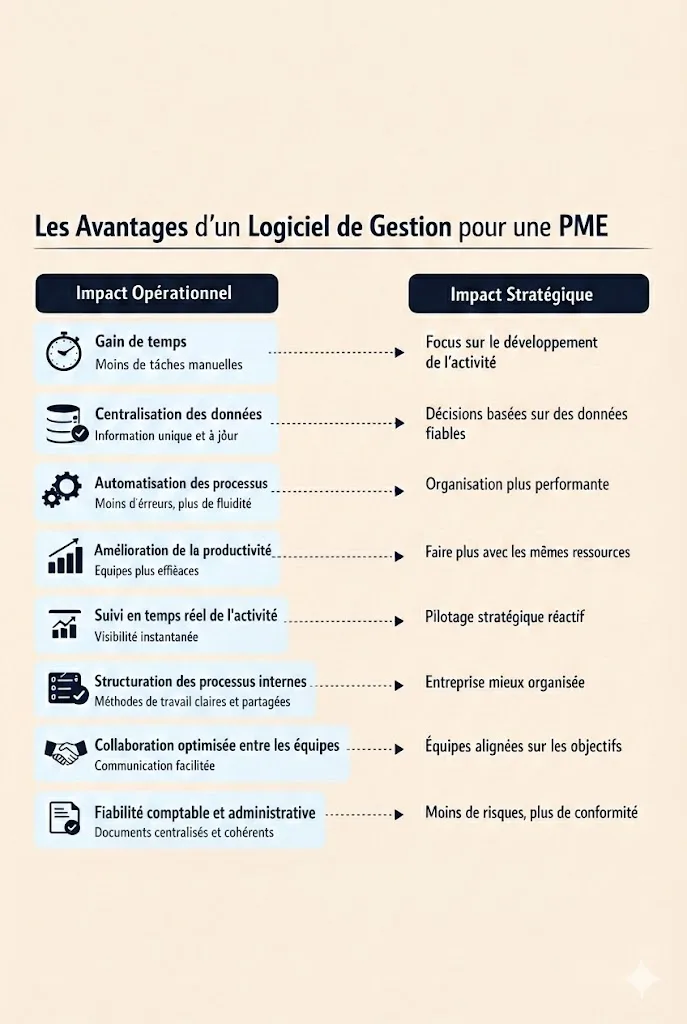
Operational benefits
- significant time savings,
- automation of tasks,
- reduced costs linked to errors and re-entry,
- improved productivity.
Strategic benefits
- better decision-making thanks to real-time reporting,
- a clear view of the business,
- the ability to support growth,
- a more professional brand image.
In many of the projects we support at Magram, the main benefit expressed after go-live is often the same: clarity.
What features does management software include?
Common features
- data centralisation,
- activity tracking,
- dashboards,
- workflow automation.
Advanced features
- customised features,
- integration with other systems,
- advanced data analysis,
- real-time synchronisation.
User experience and support
Effective software is also software that is adopted:
- clear user interface,
- user training,
- responsive technical support.
Concrete examples of use
Without naming specific solutions, here are frequent cases:
- an SME that centralises its sales management and invoicing,
- a team that structures its project management and resources,
- a growing company that makes its internal processes reliable.
In each case, the software becomes an operational foundation, not a simple tool.
The example of the custom management software for Alltricks: meeting an urgent need to simplify bike trade-ins in store and creating, in record time, an intuitive and automated application, without mobilising internal technical teams already committed to other projects.
Alltricks case visual
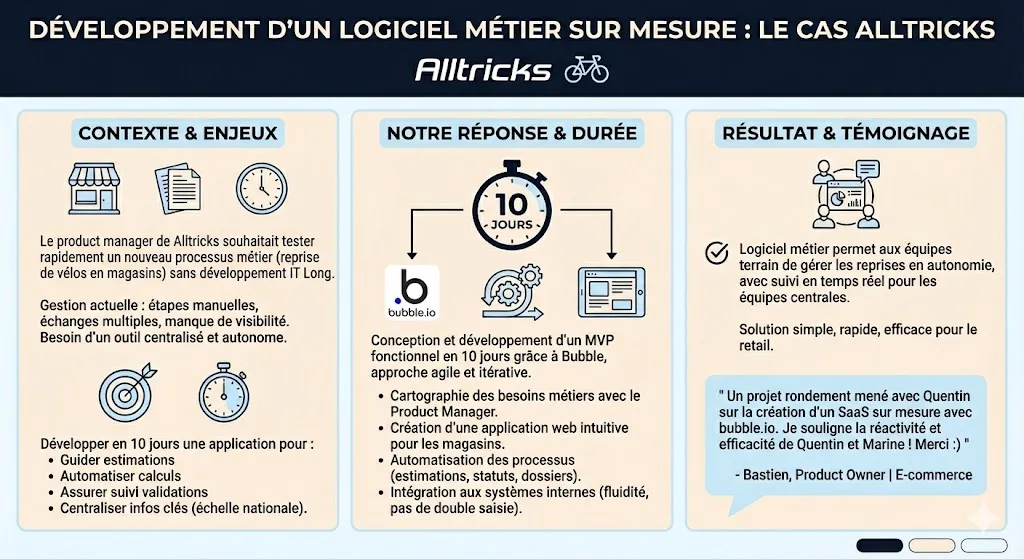
Alltricks.fr practical case
How do you know whether your company needs management software?
Some signs do not lie:
- a growing number of files and tools,
- lack of visibility on the business,
- difficulty producing reliable indicators,
- growth that is hard to control.
Management software then becomes less an option than a lever for structure.
How to choose or evolve management software?
The key criteria are generally:
- fit with business processes,
- scalability,
- integration with what exists,
- security,
- budget.
In some contexts, standard solutions reach their limits. This is often when a custom approach lets you create a tool truly aligned with real use, rather than adapting the company to the tool.
 Let's talk about your projectQuick replyNo obligation
Conclusion: management software as a foundation, not a gadget
Management software is not an isolated IT project. It is a structuring tool, at the heart of the organisation and its performance.
Well designed, it simplifies daily life, makes decisions more reliable and supports growth over time. Poorly suited, it becomes a constraint instead.
The key therefore lies less in the choice of a tool than in a real understanding of business needs and of the processes to be equipped, an approach we systematically favour at Magram when we design custom management software.
FAQ:
What is management software used for in a company day to day?
Management software is used to organise, centralise and automate a company's daily activity. It lets you manage data, operations tracking, customer relations, invoicing, accounting or project management from a single tool. In practice, it makes teams' work easier by reducing manual tasks, making information reliable and offering a global, real-time view of the business. The goal is simple: save time, improve productivity and structure internal processes to steer the company better.
What is the difference between management software, an ERP and a CRM?
Management software is a generic term for any IT solution that lets you manage one or more of a company's activities. An ERP (integrated management package) is broader management software, designed to centralise all business processes (sales, accounting, resources, stock, cash flow) in a single system. A CRM, for its part, is software specialised in managing the customer relationship: tracking sales, contacts, opportunities and customer satisfaction. In many companies, these tools can be integrated or interconnected to ensure global, consistent management.
What are the main types of management software?
There are several types of management software, each meeting a specific need:
- sales management software (quotes, orders, invoices),
- accounting and bookkeeping software,
- project and collaborative task management software,
- human resources management software,
- ERP software covering a wider perimeter.
The choice of the type of software depends on the trade, the sector of activity, the size of the company and the processes to be structured.
What are the concrete advantages of management software for an SME?
For an SME, management software offers many concrete advantages:
- time saved on administrative tasks,
- automation of repetitive processes,
- more reliable data,
- real-time tracking of activity and cash flow,
- improved team productivity.
It also helps structure growth, optimise internal communication and make decisions easier thanks to clear reports and indicators.
What criteria should guide the choice of management software?
The choice of management software must above all start from the real needs of the company. The main criteria to analyse are:
- the business processes to cover,
- the features needed,
- ease of use for users,
- the scalability of the solution,
- the overall cost,
- the quality of assistance and support.
Good software is not necessarily the one with the most features, but the one that best fits the company's daily use.
How do you choose management software suited to your business?
To choose suitable management software, it is essential to analyse your business, your sector and your objectives. You need to identify the tasks to automate, the data to centralise and the specific constraints of the trade. An SME will not have the same needs as a multi-site company or a structured sales department. The software must be able to support the evolution of the business without becoming a brake. An upstream analysis phase is often decisive in avoiding a poorly suited tool.
What is the difference between standard management software and a custom solution?
Standard management software offers generic features, designed for a large number of companies. It is quick to deploy but may show its limits as soon as business processes are specific. A custom solution, on the other hand, is designed to adapt precisely to the company's uses, constraints and internal organisation. It lets you structure unique processes, optimise operations and obtain a tool truly aligned with the reality on the ground.
Is it possible to create your own management software?
Yes, it is entirely possible to create custom management software. This approach is particularly relevant when existing tools do not meet the company's specific needs or when they generate too many manual workarounds. Custom software lets you centralise data, automate precise processes and have a scalable tool, designed as a real strategic asset serving the business and overall performance. If you have a project, a need, we can discuss it!
Also read
A question about your situation?
Ask Quentin, he replies personally.