

HubSpot, Pipedrive, Sellsy, Axonaut, Zoho, Salesforce, Monday, noCRM… Every tool claims to offer "the best experience", every interface multiplies features, every version reinvents customer relations, sales, marketing or invoicing.
The result? SMEs and small businesses face a complex question: how do you choose the best CRM **to really track, manage and turn prospects into customers? **A suitable CRM is a tool able to centralise your contacts, automate your follow-ups, simplify your quotes, smooth your sales pipeline, analyse your data, improve your multichannel communication… and save your team time.
The real challenge is not to find "the top CRM 2026", but the best CRM solution for your company, the one that matches your needs, your size, your sales cycle, your budget, your integrations… and your level of digital maturity.
In this article, we help you see clearly: trends, criteria, comparisons, solutions… and even when to consider a customisable CRM built for you.
As a reminder, what are the advantages of a CRM?
The benefits of a CRM are immediate for a small business or SME: the tool centralises all customer information, structures processes, automates follow-ups and offers clear visibility on every opportunity. By reducing manual tasks and improving coordination between teams, a CRM has a direct impact on sales: better responsiveness, shorter cycles, higher conversion rates and more rigorous sales follow-up. It is also a major lever for return on investment: fewer errors, more deals signed, a more consistent customer relationship and processes finally aligned with growth objectives. In short, a CRM turns scattered sales management into a simple, efficient system that is truly performance-oriented.
What are the CRM trends in 2026?
1. Operational AI (not just decorative)
Artificial intelligence in CRMs is no longer limited to chatbots or automatic suggestions. In 2026, AI analyses your customer data to predict opportunities, prioritise sales actions and automate low-value tasks.
CRMs now include assistants able to write personalised emails, automatically qualify leads or suggest the best moment to follow up a prospect.
2. Hyper-personalisation
Gone are the rigid workflows identical for everyone. Modern CRMs let you customise every pipeline, every stage, every automation according to your business, your organisation and even each salesperson.
This personalisation is becoming a decisive criterion for SMEs that no longer want to adapt their processes to standardised software.
3. Unification of data: marketing, sales, support
Silos are disappearing. The best CRMs of 2026 centralise marketing, sales and customer support data in a single interface. This 360° view of the customer allows more consistent actions and a smooth customer experience.
4. "Modular" CRMs: you only take what you need
Companies are rejecting oversized software suites. Modular CRMs let you activate only the features you need, thus reducing complexity and costs.
5. Business micro-CRMs (real estate, e-commerce, SaaS vendors…)
Hyper-specialised solutions are emerging for each sector. These business CRMs natively include the specificities of an industry, but lose flexibility when the company evolves.
6. New GDPR and security requirements
GDPR compliance is tightening. French companies increasingly favour European hosting and solutions that guarantee data sovereignty. Security is no longer an option, it is a prerequisite.
SaaS CRM vs custom CRM: the 2026 match
SaaS CRM: for whom, for what, and how far?
The advantages of SaaS CRMs:
- Quick deployment (a few days to a few weeks)
- Affordable entry cost with free or freemium offers
- Automatic updates and assured maintenance
- Ecosystem of ready-to-use integrations
- Standardised support and documentation
Their structural limits:
SaaS CRMs are designed for the greatest number. They impose their workflows, their logic, their interface. When your business processes depart from the standard, you either have to adapt them (at the expense of your efficiency), or multiply workarounds and third-party tools.
The cost rises quickly with options: additional users, advanced modules, premium integrations, extended storage.
Custom CRM: when does it become relevant?
A custom CRM is justified in several precise situations:
Your business processes are atypical You cannot find any CRM able to handle your specific sales cycle, your unique qualification rules or your particular traceability needs.
Several scattered tools create friction You juggle between an Excel spreadsheet, an invoicing tool, a project tracking solution and a support software. Every piece of data is entered several times. No overall view is possible.
Frustrations pile up with market CRMs You have tested 3, 4, 5 solutions. Each has blocking limits. You lose time working around the software's rigidities instead of focusing on your customers.
You need to evolve without constraints Your business changes, your needs evolve quickly. SaaS CRMs impose their roadmap on you, not yours.
 Let's talk about your projectQuick replyNo obligation
CRM selection criteria: SaaS or custom?
Choose a SaaS CRM if:
- Your sales processes are standard
- You need an operational solution immediately
- Your initial budget is limited (under €10,000)
- You are looking for an existing ecosystem of integrations
Consider a custom CRM if:
- No CRM on the market covers your business needs
- You already use 3 or more tools to manage your customer relationship
- Your SaaS CRM cost exceeds €500/month per user with options
- You have specific security or hosting requirements
- You want a scalable solution without depending on a vendor
How to choose a suitable CRM?
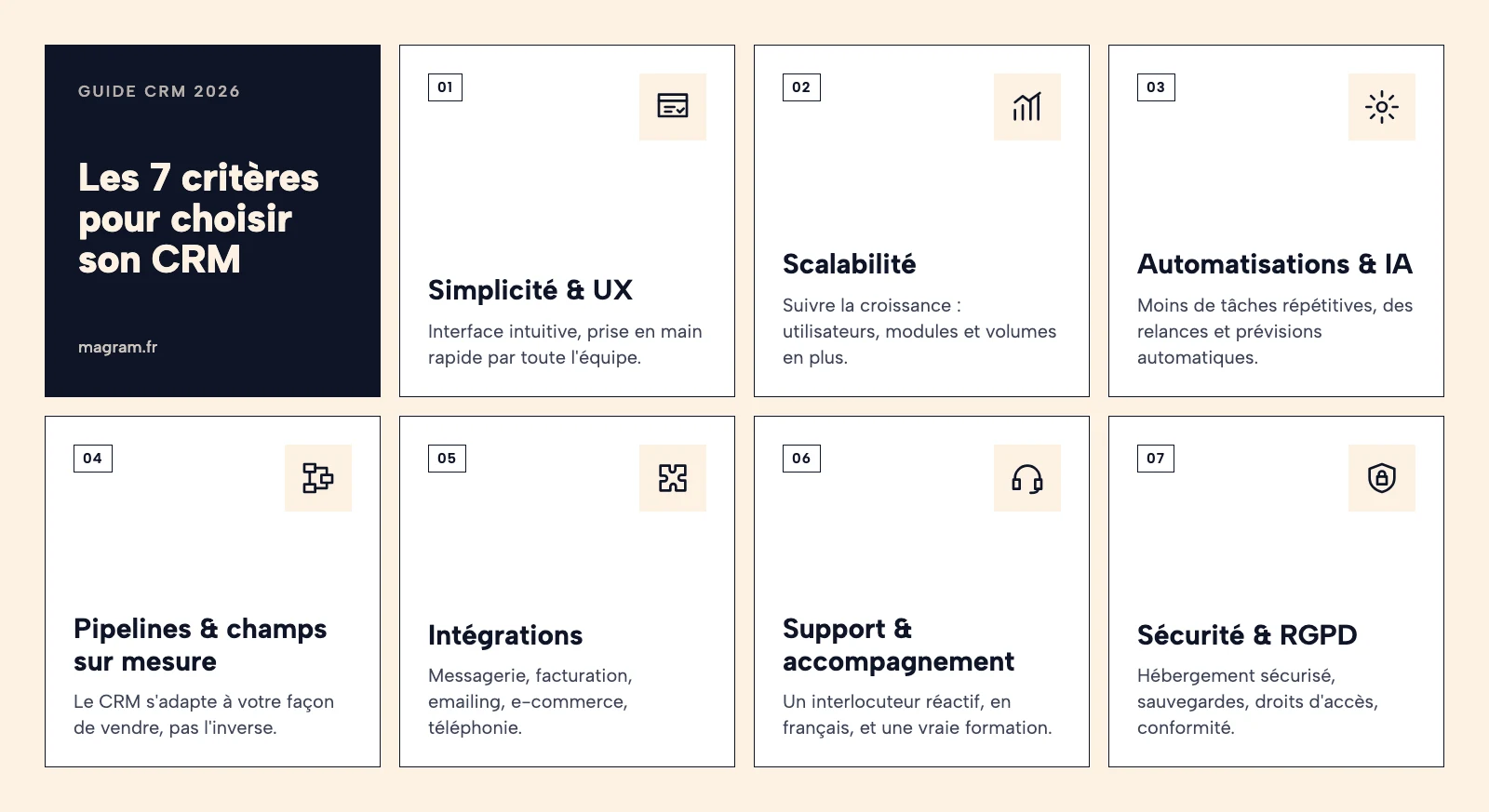
1. Simplicity and UX
A complex CRM will not be used. Period. The best feature in the world is useless if your teams do not adopt it.
What to check:
- Intuitive interface, clear navigation
- Short learning time (ideally under a day)
- Effective mobile version
- Interface customisation according to roles
2. Scalability (not having to change again in 2 years)
Your CRM must grow with you. Anticipating your future needs avoids costly migrations.
Questions to ask yourself:
- Does the CRM support 50, 100, 500 users?
- Can you add modules without reconfiguring everything?
- Does performance stay smooth with a large volume of data?
3. Automations and business AI
Repetitive tasks kill productivity. A good CRM automates what can be automated.
Essential automations:
- Automatic task creation according to pipeline stages
- Scheduled follow-ups
- Automatic lead assignment
- Scoring and qualification of opportunities
- Generation of scheduled reports
4. Customisation of pipelines and internal processes
Every company sells differently. Your CRM must reflect your reality, not a theoretical model.
Level of customisation needed:
- Multiple pipelines (different by product, by segment, by market)
- Stages and statuses adapted to your vocabulary
- Unlimited custom fields
- Specific business rules
5. Native integrations (invoicing, e-commerce, marketing automation…)
An isolated CRM loses much of its value. Integrations create the ecosystem that multiplies its effectiveness.
Priority integrations for an SME:
- Email (Gmail, Outlook)
- Telephony (VoIP, call recording)
- Invoicing (Pennylane, QuickBooks, Sage)
- Marketing automation (Mailchimp, Brevo)
- E-commerce (Shopify, WooCommerce, PrestaShop)
- Electronic signature (DocuSign, Yousign)
6. Human support and guidance
Technical support makes the difference when a problem blocks your business.
To assess:
- Average response time
- Support in your language
- Availability (hours, channels)
- Onboarding support
- Documentation and training resources
7. Security, hosting and GDPR compliance
Customer data is sensitive. Security and compliance are not negotiable.
Points of vigilance:
- Data hosting (France, EU, outside the EU)
- Certifications (ISO 27001, HDS if health data)
- Backup policy
- Granular access rights management
- Native GDPR compliance (portability, right to be forgotten)
Which CRM for which type of company?
1. CRM for small businesses / independents
Main need: simplicity, minimal cost, immediate take-up.
Recommended solutions:
- Advantages: free, clean interface, excellent for getting started
- Limits: basic features, costly to move up
- Ideal for: independents, consultants, new studios
- Advantages: free CRM, built-in emailing, French solution
- Limits: advanced features reserved for paid plans
- Ideal for: small businesses that already send newsletters and want to track their contacts in the same place
- Advantages: very visual, customisable, good ergonomics
- Limits: becomes expensive with several users
- Ideal for: small businesses of 2 to 10 people with visual needs
- Advantages: very competitive price, simplified version of Zoho CRM
- Limits: limited features vs full Zoho CRM
- Ideal for: micro-businesses on a tight budget
Avantage Business CRM
- Advantages: French solution, simple, aimed at small businesses
- Limits: reduced ecosystem of integrations
- Ideal for: small businesses looking for a local solution
- Advantages: quick take-up, visual pipeline, automatic reminders
- Limits: sales-focused, limited marketing
- Ideal for: independents and small businesses that want simple sales tracking
2. Which CRMs suit SMEs?
Main need: the best CRM for SMEs in 2026 is a balance between power and simplicity, French accounting integrations, support in French.
CRM solutions for small companies:
- Advantages: sales focus, visual pipeline, excellent automations
- Limits: less suited if strong marketing or customer support needs
- Ideal for: CRM for small businesses and SMEs with structured sales teams
- Advantages: integrated CRM + invoicing + accounting, 100% French
- Limits: interface sometimes dated, learning curve
- Ideal for: CRM for SMEs looking for a complete French suite
- Advantages: free CRM linked to email, SMS and WhatsApp campaigns, French solution
- Limits: CRM less advanced than purely sales tools
- Ideal for: SMEs that want to run prospecting and marketing from the same tool
- Advantages: all-in-one (CRM, quotes, invoicing, accounting), French
- Limits: CRM less powerful than the specialists
- Ideal for: service SMEs wanting to centralise management and invoicing
Zoho CRM
- Advantages: very complete, aggressive prices, many integrations
- Limits: complexity, needs configuration
- Ideal for: SMEs with advanced needs and the resources to configure it
Microsoft Dynamics 365
- Advantages: powerful, Microsoft ecosystem, scalability
- Limits: high cost, significant complexity
- Ideal for: fast-growing SMEs already in the Microsoft ecosystem
- Advantages: CRM, invoicing, WhatsApp and VoIP integrations
- Limits: no marketing and customer support modules
- Ideal for: SMEs that want to sell effectively without the complexity of classic CRMs
3. CRM for e-commerce
Main need: shop synchronisation, customer segmentation, marketing automations.
Recommended solutions:
HubSpot (Starter/Pro)
- Advantages: excellent marketing features, native e-commerce integrations
- Limits: high cost on advanced versions
- Ideal for: e-merchants with an inbound marketing strategy
- Advantages: specialised in e-commerce, advanced segmentation, powerful email marketing
- Limits: email focus, less suited to complex B2B sales
- Ideal for: pure e-commerce players with a high volume of customers
Pipedrive
- Advantages: good for B2B e-commerce, Shopify/WooCommerce integrations
- Limits: limited marketing features
- Ideal for: B2B e-commerce with a structured sales cycle
Zoho CRM
- Advantages: e-commerce modules, attractive price, customisable
- Limits: configuration needed
- Ideal for: e-merchants looking for flexibility and a controlled budget
4. CRM for a SaaS company
Main need: tracking the customer life cycle, onboarding, churn prevention, expansion revenue.
Recommended solutions:
- Advantages: modern, flexible, designed for tech teams
- Limits: young solution, features still being built
- Ideal for: SaaS start-ups
Folk
- Advantages: modern interface, excellent for networking and relationships
- Limits: less suited to large volumes
- Ideal for: SaaS sales teams
HubSpot Pro/Enterprise
- Advantages: complete, marketing automation, built-in customer success
- Limits: significant cost
- Ideal for: growing SaaS with a mature inbound strategy
Notion CRM (with templates)
- Advantages: total flexibility, native collaboration
- Limits: needs manual building, no native CRM
- Ideal for: small SaaS teams looking for maximum customisation
5. Business-specific CRMs
Real estate: Hektor, Facilogi (mandate, viewing and buyer management)
Trades/Services: Organilog, Planity, Praxedo (interventions, quotes, scheduling)
Consulting: Notion, Monday, Asana + CRM (project + customer management)
Healthcare: Doctolib, Maiia (appointments, patient files)
These business solutions excel in their field but lack the flexibility to evolve towards other activities.
6. When no market CRM will do: custom
Some companies find that no standard CRM matches their needs. Their business processes are too specific. Their constraints too particular. Their organisation too unique.
Signs that you are in this case:
- You have tested more than 5 CRMs without finding satisfaction
- You spend more time working around the CRM's limits than using it
- Your teams refuse to use the CRMs imposed on them
- You maintain parallel Excel files "because the CRM does not allow…"
- Your integration needs go beyond what standard connectors offer
The solution: a CRM built for you
A custom CRM starts from your real processes to build the tool that serves them. Not the other way round. It includes exactly what you need. Nothing more, nothing less. It evolves at your pace, according to your priorities.
| Company profile | Monthly budget | Recommended solutions | Strengths | Avoid if… |
|---|---|---|---|---|
| Independent / Solo | €0–20 | HubSpot Free, Zoho Bigin, noCRM | Free, simple, fast | Rapid growth expected |
| Small business (2–10 people) | €20–50/user | Pipedrive, Monday, Axonaut, noCRM | Good value for money | Very complex processes |
| SME (10–50 people) | €50–100/user | Sellsy, Zoho CRM, HubSpot Pro, noCRM | Complete, scalable | Very specific needs |
| SME (50+ people) | €100–200/user | Salesforce, Dynamics 365 | Powerful, scalable | Tight budget |
| SME / mid-sized company – atypical processes | Variable | Custom CRM (Magram) | 100% adapted, scalable | Immediate needs (< 2 months) |
The top 10 best CRMs in 2026 (small businesses and SMEs)
Best free CRM: HubSpot Free CRM
Why: clear interface, essential features, unlimited users, excellent entry point with no commitment.
Limits: limited automations, basic reports, costly to move up.
Best free CRM linked to emailing: Brevo
Why: French solution, free CRM directly connected to email, SMS and WhatsApp campaigns. Ideal for an SME that wants to track its contacts and follow-ups from the same tool as its newsletters.
Limits: CRM less advanced than a purely sales tool (pipelines, reporting), advanced features and sending volumes reserved for paid plans.
Best value for money: Pipedrive
Why: Affordable (€14/user/month), effective sales focus, visual pipeline, solid automations.
Limits: marketing and customer support features less developed.
Best for e-commerce: Klaviyo
Why: designed for e-commerce, advanced customer segmentation, powerful email marketing, native Shopify/WooCommerce integrations.
Limits: less suited to complex B2B.
Best CRM for French SMEs: Sellsy
Why: complete French solution (CRM + invoicing + accounting), support in French, French accounting integrations.
Limits: interface could be better, learning curve.
Best for sales teams: Salesforce Sales Cloud
Why: the most powerful, infinite customisation, huge ecosystem, maximum scalability.
Limits: high cost (€75 to €300/user/month), significant complexity, requires expertise.
Best for SaaS vendors: Attio
Why: modern, flexible interface, designed for product teams, native collaboration.
Limits: recent solution, features still in development.
Best for growing small businesses and SMEs: Zoho CRM
Why: minimal price (€7/user/month), quick to pick up, and extensible into a complete suite (Zoho CRM Plus: CRM + marketing + support + analytics) as the company grows.
Limits: more complex configuration as you move up.
Best visual CRM: Monday CRM
Why: ultra-intuitive interface, customisable boards, excellent for visualising pipelines.
Limits: cost that climbs quickly with options.
Best for pure sales teams: noCRM
Why: prospecting lists + pipelines, automatic reminders, call scripts, VoIP integrations.
Limits: no marketing or support module.
Outside the ranking: when no CRM fits, custom by Magram
Why: built exactly to your processes, total scalability, no functional compromises, native integrations with your information system.
For whom: companies with atypical business processes, complex integration needs, or repeated frustrations with standard CRMs. See our work on custom CRMs.
| CRM | Overall score | Price/month | Best for | Strength | Weakness |
|---|---|---|---|---|---|
| HubSpot Free | 4 | €0 | Getting started | Interface + free | Prices climb fast |
| Brevo | 4 | €0 (paid from €9) | CRM + emailing | Email, SMS, WhatsApp built in | Sales CRM less advanced |
| Pipedrive | 5 | €14–99 | Salespeople | Visual pipeline | Limited marketing |
| Sellsy | 4 | €39–89 | French SMEs | French all-in-one | Dated interface |
| Zoho CRM | 4 | €14–52 | Tight budget | Price + features | Setup complexity |
| Monday CRM | 4 | €12–24 | Visual/teams | Excellent UX | Cost per option |
| Salesforce | 5 | €75–300 | Large SMEs / mid-sized companies | Maximum power | Complexity + cost |
| Axonaut | 4 | €30–70 | French services | CRM + Accounting | CRM less advanced |
| Attio | 4 | €29–99 | SaaS / Start-ups | Modern + flexible | Young solution |
| Klaviyo | 5 | €20–60 | E-commerce | Email + segmentation | E-commerce only |
| noCRM | 5 | €11-39 | Sales teams | Simplicity + sales focus | No dedicated marketing module |
| Magram CRM | 5 | On quote | Unique processes | 100% customised | Initial investment |
Free CRM: a good idea or a false bargain?
What you can really do with a free CRM
Free CRMs today offer respectable features:
- Unlimited contact management (HubSpot, Zoho)
- Creation of deals and basic pipelines
- Tracking of interactions (emails, calls, meetings)
- A few standard reports
- Email integration
- Mobile app
For an independent, a consultant or a very small structure, this may be enough.
Their technical (and commercial) limits
Functional limits:
- Limited or absent automations
- Basic reports, impossible to create custom dashboards
- Number of users sometimes capped
- Limited storage
- Reduced support (community only)
- No advanced integrations
Strategic limits: Free versions are designed to make you migrate to paid versions. Every limit you hit becomes a sales argument. The psychological cost of migration (data, training, habits) ties you to the vendor.
When it becomes a brake on growth
A free CRM becomes a problem when:
- You spend more time working around its limits than using it
- Your processes evolve but the CRM does not keep up
- You lose opportunities for lack of automation
- Your teams lose motivation in the face of daily frustrations
- The ROI of a more powerful CRM becomes obvious
The real question is not "free or paid?" but "what is the cost of inefficiency?"
A salesperson who loses 30 minutes a day because of an unsuitable tool costs far more than a premium CRM subscription.
What budget should you plan for a CRM in 2026?
The budget for a CRM in 2026 depends mainly on three factors: the model (SaaS or custom), the number of users and the level of automation expected. SaaS solutions often start low… then climb quickly as soon as you add options, integrations or more access. Conversely, a custom CRM requires a larger initial investment, but remains predictable and perfectly aligned with internal processes.
In reality, it is not the price that makes the difference: it is the total cost for your company, in time, in complexity, in changing tools, in training, and sometimes even… in frustration.
What to do if market CRMs do not match your processes?
The signs that your company is "too unique" for a SaaS
Sign 1: You have tested 5+ CRMs without satisfaction Each trial reveals the same limits. The processes never quite fit. Compromises pile up.
Sign 2: Your teams maintain parallel tools Excel, Google Sheets, Notion, Airtable... as many workarounds proving that the official CRM does not meet real needs.
Sign 3: You lose time "fitting" your processes into the tool Instead of optimising your business, you optimise your use of the CRM. The tool has become the problem, not the solution.
Sign 4: Your integrations require custom development Native connectors are not enough. You have to code bridges, maintain scripts, juggle webhooks.
Sign 5: The cost explodes for features you do not need To get THE missing feature, you have to pay for an enterprise plan that includes 50 useless modules.
The recurring limits of market CRMs
Rigid workflows SaaS CRMs impose their logic. Predefined stages, standardised statuses, generic rules. Your specific sales cycle becomes a headache.
Limited customisation You can customise... within the limits of the configuration. Impossible to change the fundamental architecture, add modules outside the catalogue, or create interactions that were not planned.
Superficial integrations Connectors exist but rarely synchronise everything you need. Partial data, latencies, mapping errors, update conflicts.
Degraded performance with volume SaaS CRMs share their infrastructure. When your data grows or your automations get more complex, slowdowns appear.
Dependence on the vendor's roadmap Waiting for a critical feature? It may arrive... in 6 months, 2 years, or never. Your priorities are not theirs.
**Cost that explodes with growth **More users, more contacts, more features = a multiplied bill. The CRM becomes your 2nd or 3rd software expense.
What a custom CRM allows
UX adapted to your real users The interface reflects your vocabulary, your organisation, your habits. Your salespeople, technicians and managers see exactly what they need.
Automations specific to your company No "adjustable generic workflow". Your exact business rules, coded and executed without compromise.
Modules built on demand Need a warranty management module? Regulatory traceability? Complex commission calculation? We build it.
Total scalability Your business evolves. Your CRM evolves with it. New processes, new rules, new integrations: everything is possible without waiting for a vendor.
Native integrations with your information system Direct connection to your ERP, your business software, your databases. No third-party connector, no limit, no latency.
Control of costs in the long term After the initial investment, costs are predictable and controlled. No pricing surprises, no imposed annual increase.
Data sovereignty Hosting where you want, full access to the data, no dependence on a vendor.
How a custom CRM is built: the Magram method
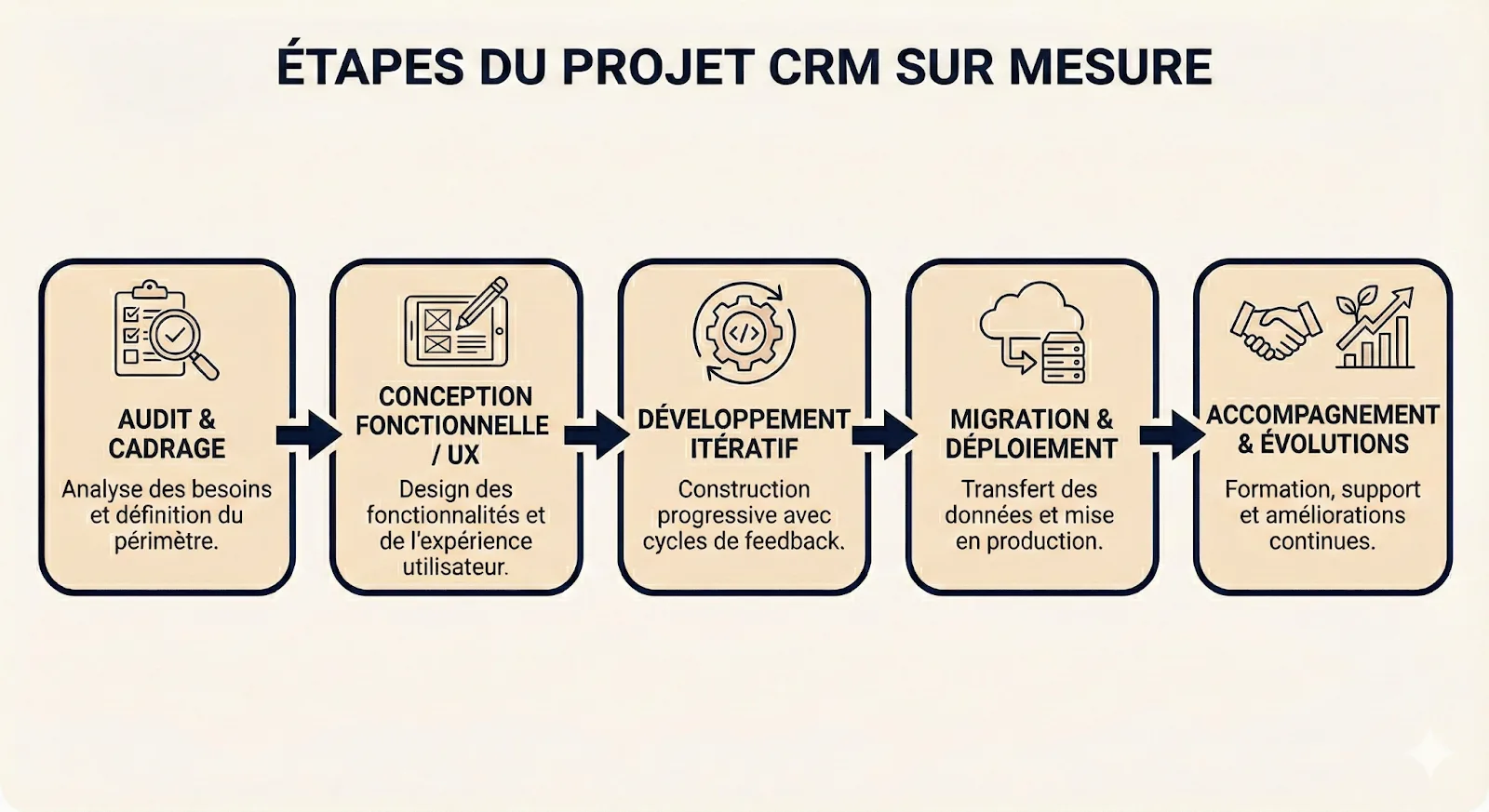
Step 1: Audit and scoping
Understanding your current processes:
- Analysis of existing workflows
- Identification of friction points
- Mapping of the tools used
- Gathering of needs by role
Defining priorities:
- Critical features vs nice-to-have
- Phasing of the project (MVP then enhancements)
- Technical and budgetary constraints
Step 2: Functional design
Mock-ups and wireframes:
- Interface design according to your needs
- Validation of the user experience
- Definition of user journeys
Technical architecture:
- Choice of suitable technologies
- Database design
- Integration plan with your existing information system
Step 3: Iterative development
Agile approach in sprints:
- Development of priority features
- Regular validation points
- Continuous adjustments
Continuous testing:
- Unit and integration tests
- User tests with your teams
- Performance optimisation
Step 4: Migration and deployment
Data migration:
- Import from your current tools
- Cleaning and harmonisation
- Integrity validation
Gradual deployment:
- Pilot phase with a test group
- User training
- Gradual scale-up
Step 5: Support and evolution
Post-launch support:
- Resolution of any bugs
- User support
- Optimisations based on real use
Functional enhancements:
- Adding new features according to your needs
- Adapting to changes in your business
- Continuous improvement
At Magram, we build CRMs that fit your processes.
Our approach: turning your operational constraints into custom software. Simple to use. Quick to deploy. Designed to last.
We create tools that really matter for your business. Not overengineered messes. Powerful but accessible solutions, built for people who get things done.
Our method: less complexity, more impact. Every CRM we develop starts from your business reality to create the tool that saves you time, not loses it.
How to succeed in a CRM migration in 2026?
A poorly prepared CRM migration can paralyse your sales activity for weeks. A well-run migration happens without friction, even improving productivity immediately.
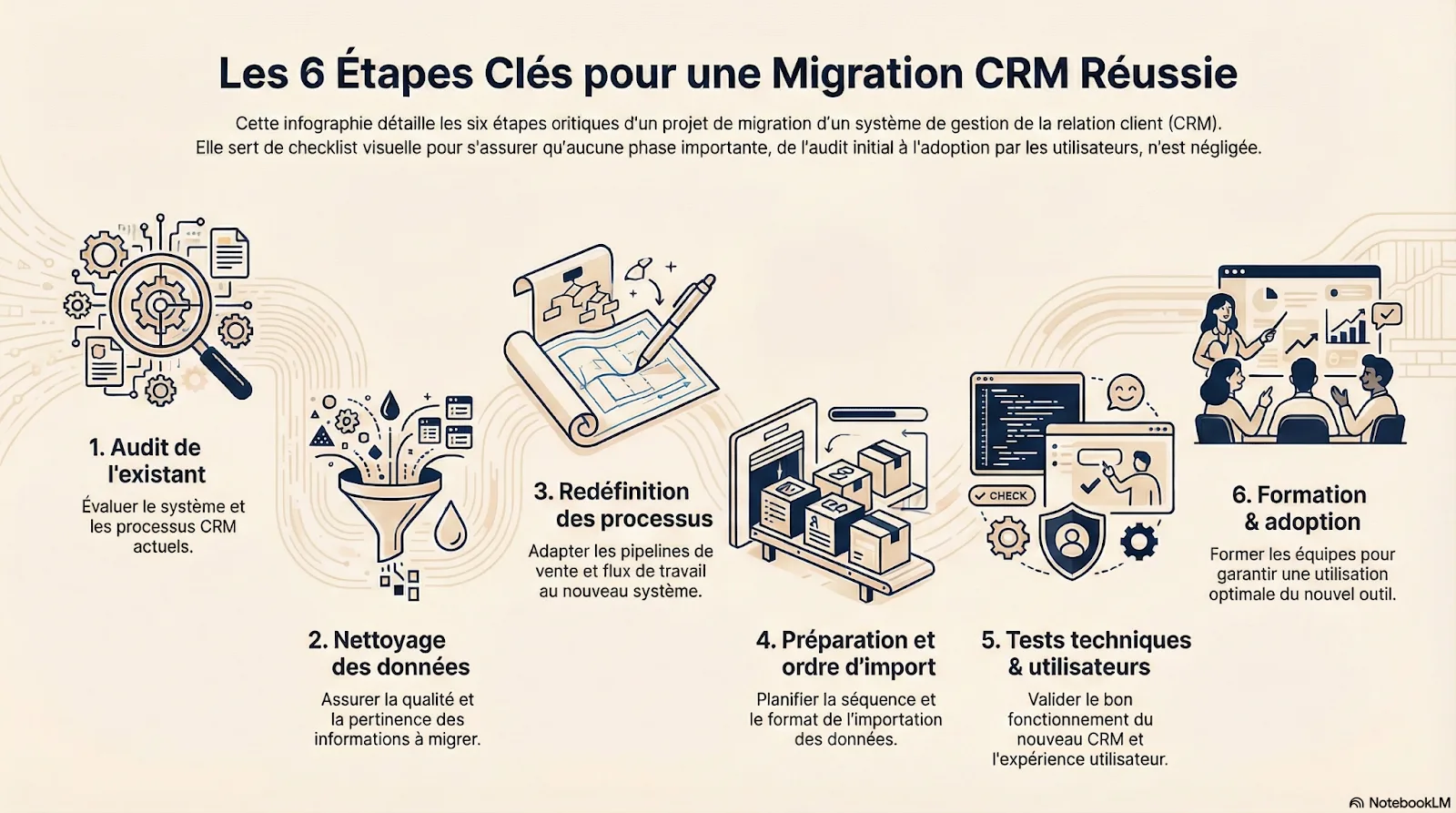
1. Audit of what exists
Mapping what exists:
- What data is in the old system?
- What level of quality (duplicates, obsolete data)?
- What processes are currently in place?
- What integrations with other tools?
Identifying real needs:
- What must absolutely be kept?
- What can be abandoned or archived?
- What new needs for the future CRM?
Defining success criteria:
- Measurable objectives (adoption rate, time saved, error rate)
- Realistic schedule
- Allocated budget
2. Data cleaning
DeduplicationMerge duplicate contacts, accounts and opportunities. One clean contact is worth more than three contradictory records.
QualificationComplete the essential missing information: sector, company size, lead source, current status.
ArchivingIdentify and archive obsolete data (prospects cold for 2+ years, lost customers with no historical value).
StandardisationStandardise formats (phone numbers, addresses, statuses, tags).
Good cleaning can reduce the volume of data to migrate by 30 to 50% while increasing its quality.
3. Defining pipelines and processes
Modelling your new processes:
- Stages of your sales cycle
- Opportunity qualification criteria
- Lead assignment rules
- Automations to set up
Configuring the new CRM:
- Create the suitable pipelines
- Set up custom fields
- Configure access rights by role
- Set up the priority automations
Validate with end users: Do not configure in a vacuum. Involve your sales teams from this stage.
4. Historical migration
Preparing the import:
- Map fields old system → new CRM
- Prepare the import files (CSV, Excel)
- Define the import order (accounts → contacts → opportunities → activities)
Import in several phases:
- Test import on a sample
- Integrity check
- Full import in batches
- Systematic post-import checks
Managing links and relationships: Keep the links between contacts and accounts, opportunities and contacts, tasks and deals.
5. Testing and validation
Functional tests:
- Real user scenarios
- Verification of automations
- Testing of third-party integrations
- Validation of reports and dashboards
Performance tests:
- Loading time
- Smoothness with real data volume
- Real-time synchronisations
Pilot phase: Deploy to a test group (5-10 users) for 1-2 weeks before the general deployment.
6. Training and adoption
Initial training:
- Sessions by user profile (sales, managers, support)
- Hands-on training with real cases
- Documentation and practical guides
Reinforced support during launch:
- Availability of an internal or external lead
- Quick resolution of blockages
- FAQ continuously enriched
Tracking adoption:
- Measure the daily usage rate
- Identify resistance and deal with it
- Celebrate quick wins
The secret of a successful migration: involve users from the start and never underestimate training time.
The best CRM is the one that adapts to your processes (not the other way round)
We have explored dozens of solutions. Compared features. Analysed costs. Defined selection criteria.
But the conclusion is always the same: the best CRM is not the one with the most features. It is the one that saves you time instead of losing it.
Three possible paths open up to you
1. Adopt a standard SaaS CRM If your processes are classic, your needs standard and your budget limited: HubSpot, Pipedrive, Zoho or Sellsy will do perfectly.
2. Live with the limits of a general-purpose tool Accept the compromises, develop workarounds, pay for the options. It works... until the frustrations outweigh the benefits.
3. Build a CRM that looks like you If your processes are unique, if you have tested without satisfaction, if SaaS costs explode: custom becomes the most profitable and most effective option.
The essentials to remember
- Your needs before the tool: start from your real processes, not from a list of marketing features
- Total cost matters: beyond the advertised price, calculate migrations, training, integrations, frustrations
- Adoption is everything: the technically best CRM will fail if it is not used
- You are not alone: whether you choose SaaS or custom, get support
Need a personalised diagnosis?
Do not know which CRM to choose? Wondering whether custom is relevant for your case?
At Magram, we do not sell standard CRMs. We build yours.
Want to explore what custom could change for you?
Let us talk about your processes, your current frustrations, your ambitions. No obligation. Just a frank discussion about what would really work for your company.
FAQ
A CRM lets you centralise contacts, track sales, automate follow-ups and organise sales work. For a small business or SME, it is a simple tool that saves time, improves the customer relationship and increases conversion by giving clear visibility on opportunities.
Start by defining your needs: contacts to track, tasks to automate, tools to integrate. Then test 2 or 3 CRMs (HubSpot, Pipedrive, Zoho…) to check that the interface is simple, clear and suited to your team. The best CRM is the one you will really use, not the one with the most features.
For a small team, favour a simple and visual CRM such as Pipedrive, HubSpot, Sellsy or Zoho. They offer a clear pipeline, follow-up automations and quick deal tracking, without unnecessary complexity.
Not entirely. A CRM manages contacts, quotes, sales and follow-ups, whereas an ERP also covers production, stock and accounting. But for a small company without industrial needs, a CRM can serve as a simple, affordable mini-ERP.
Yes, if your processes are specific and standard software does not adapt.A custom CRM offers a personalised interface, suitable automations and perfect integration with your internal tools, without the limits of a generic SaaS.
Also read
- How to build a custom CRM
- CRM pricing: how much does CRM software cost in 2026? (SaaS, custom and full comparison)
A question about your situation?
Ask Quentin, he replies personally.